Happypath™ APIs
Door-level data, wherever you need it
Create collection requests from your order system, get the entrance, walking path and door photos back, and hand couriers a directions link. It's the same data Companion uses, through a REST API, a checkout widget or an MCP server for AI assistants.
Four ways in
Pick what fits your stack
All four run on the same doors, paths and photos.
Server
REST API
Create collection requests and read back the door, path, tenant and photos. JSON over HTTPS with a Bearer key. You share the link yourself.
Browser
Checkout widget
A React component for your checkout. The shopper picks who is receiving and the entrance, and the door id travels with the order.
Happypath™ Checkout →AI assistants
MCP server
Let ChatGPT, Claude or Cursor look up entrances, explain the last metres with photos and propose corrections.
In every answer
Directions links
Responses include a Happypath link and map image that open in any browser. Put it on the order, the booking or the SMS.
How it fits together
From an address to the door in two calls
The example is a real request to Happypath's office in Colletts gate 43, made with a Svisj test key.
1 · Create
Send the address and your order reference
If we already know the door, the request comes back partly filled. Either way you get a collection link for the recipient and a directions link for the courier.
curl -X POST https://api.happypath.no/api/v1/happypath_request \
  -H "Authorization: Bearer $HAPPYPATH_API_KEY" \
  -H "Content-Type: application/json" \
  -d '{
    "address": {
      "street_name": "Colletts gate",
      "street_number": "43",
      "postcode": "0456",
      "postarea": "Oslo"
    },
    "apartment_id": "Happypath",
    "customer_reference": "SV-10422"
  }'

{
  "object": "happypath_request",
  "input_state": "PARTIALLY_FILLED",
  "customer_reference": "SV-10422",
  "urls": {
    "end_user": "https://go.happypath.no/c/KlXW_kHoNR",
    "courier": "https://go.happypath.no/v/KlXW_kHoNR"
  }
}
2 · Read
Fetch the door data when you need it
Entrance, walking path, tenant, floor, door photos and a map image, ready for your TMS, CRM or support tools. Search by address when you don't have a request.
GET /api/v1/happypath_request/collected_data/KlXW_kHoNR

{
  "object": "collected_data",
  "street_address": {
    "street_name": "Colletts gate",
    "number": "43",
    "post_area_code": "0456"
  },
  "entry_door": {
    "id": "edo_rf1BkuHaQveM",
    "coordinates": { "lat": 59.92933, "lng": 10.74121 }
  },
  "entry_door_path": { "id": "edp_Uk6qOad2y0yi", "linestring": [ … ] },
  "tenant": { "business_name": "Happypath", "apartment_id": "Happypath" },
  "metadata": {
    "entry_door": [{ "attr_name": "ELEVATOR", "attr_value": "false" }],
    "entry_door_path": [
      { "attr_name": "TROLLEY_FRIENDLY", "attr_value": "true" }
    ],
    "tenant": [
      { "attr_name": "FLOOR", "attr_value": "3" },
      { "attr_name": "CALLING_ID", "attr_value": "Happypath" }
    ]
  },
  "images": {
    "door_image_url": "https://…",
    "map_image_url": "https://…"
  },
  "urls": { "directions_page": "https://go.happypath.no/v/KlXW_kHoNR" }
}
Endpoints
The whole REST API on one page
Base URL https://api.happypath.no/api/v1. Authenticate from your server with a secret API key from the Partner Portal as a Bearer token.
Collection requests
- POST
/happypath_requestCreate a request for an address. The response has the collection link for the recipient and the directions link for the courier.
- GET
/happypath_requestList your requests, filtered by state.
- GETPATCHDELETE
/happypath_request/{id}Read, update or delete one request.
Door data
- GET
/happypath_request/collected_data/{slug}Everything collected for a request: address, entrance, walking path, tenant, details, door photos and a map image.
- GET
/search?q={address}Find door data by address without a request, optionally for one apartment or business.
Maps and addresses
- GET
/happypath-imageA static map image of the path to the door, for notifications, support tools and previews.
- GET
/addresses/bboxThe addresses inside a small map area with their mapping status, up to 250 per call.
AI assistants and the browser
- POST
/mcpModel Context Protocol for ChatGPT, Claude, Cursor and other MCP clients.
- GETPOST
/api/sdk/…What the Checkout widget calls from your shop's allowed origins, with a publishable key. You don't call these yourself.
MCP server
Let AI assistants find the door
Add Happypath to ChatGPT, Claude or Cursor and ask for the way in. Answers come from the same doors, paths and photos couriers use, with a Happypath link and map.
- ChatGPT: add https://api.happypath.no/api/v1/mcp and sign in with your Happypath account.
- Claude, Cursor and other MCP clients: the same URL, with your API key.
- Search addresses and businesses, explain directions, render a map, propose a correction or create a collection request.
- Corrections are reviewed before they're published.
explain_directions({ "query": "Happypath offices" })

# Directions to Happypath at Colletts gate 43, 0456 OSLO

Happypath directions: https://go.happypath.no/v/tnt_BiAljmn4mZwC
There is no elevator.
Approach on foot. The approach is trolley-friendly.

## Tenants
- Happypath (matched) — floor 3 — calling ID Happypath

+ a Happypath map, the entrance photo and the office door photo
Partner Portal
Everything around the API in one place
Your developers and operations team share one workspace at partner.happypath.no.
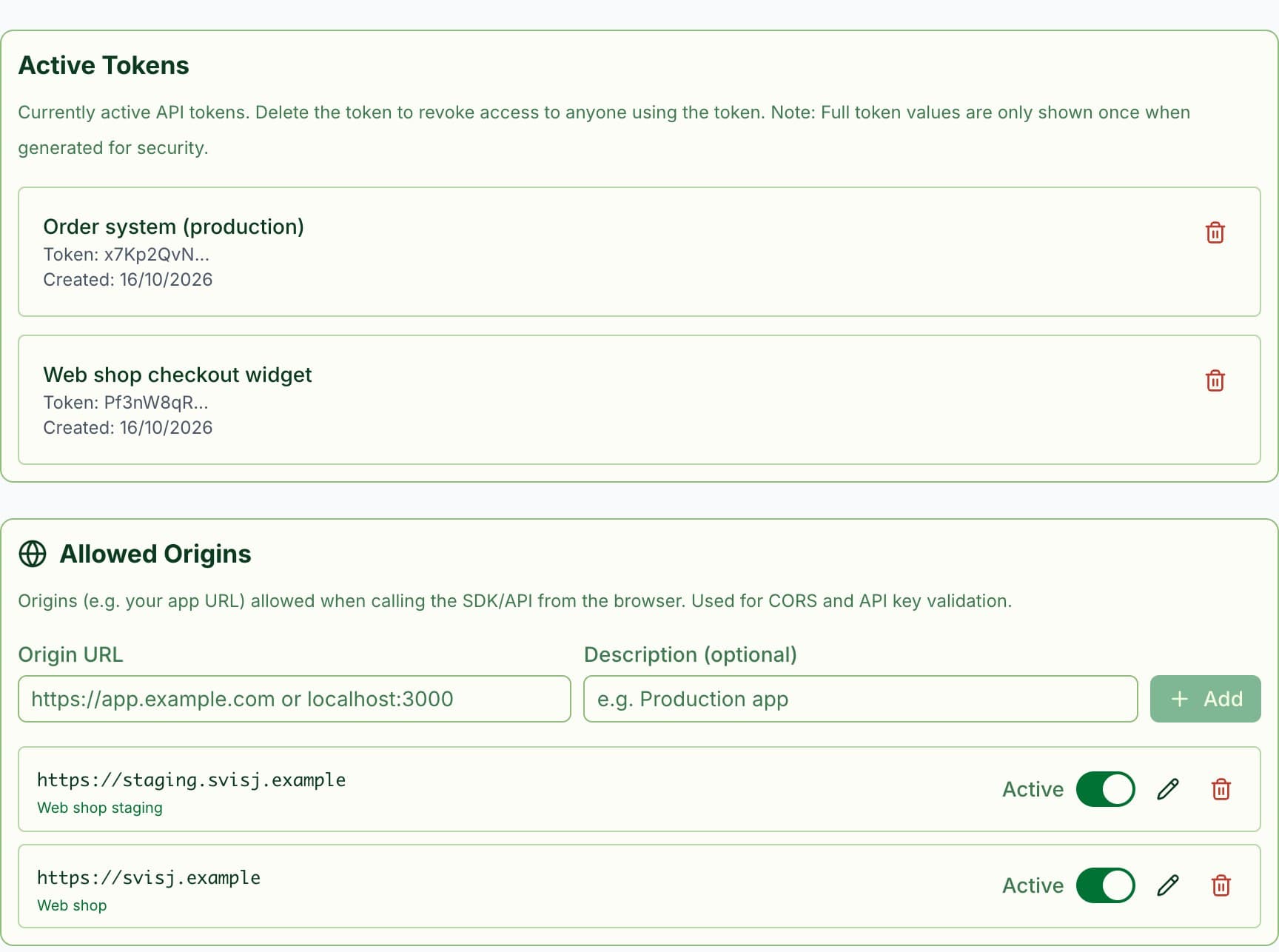
Keys and allowed origins
Secret keys for your servers, one per system, and publishable keys for the Checkout widget in the browser. Revoke a key in one click, and allow the domains your web shop runs on.
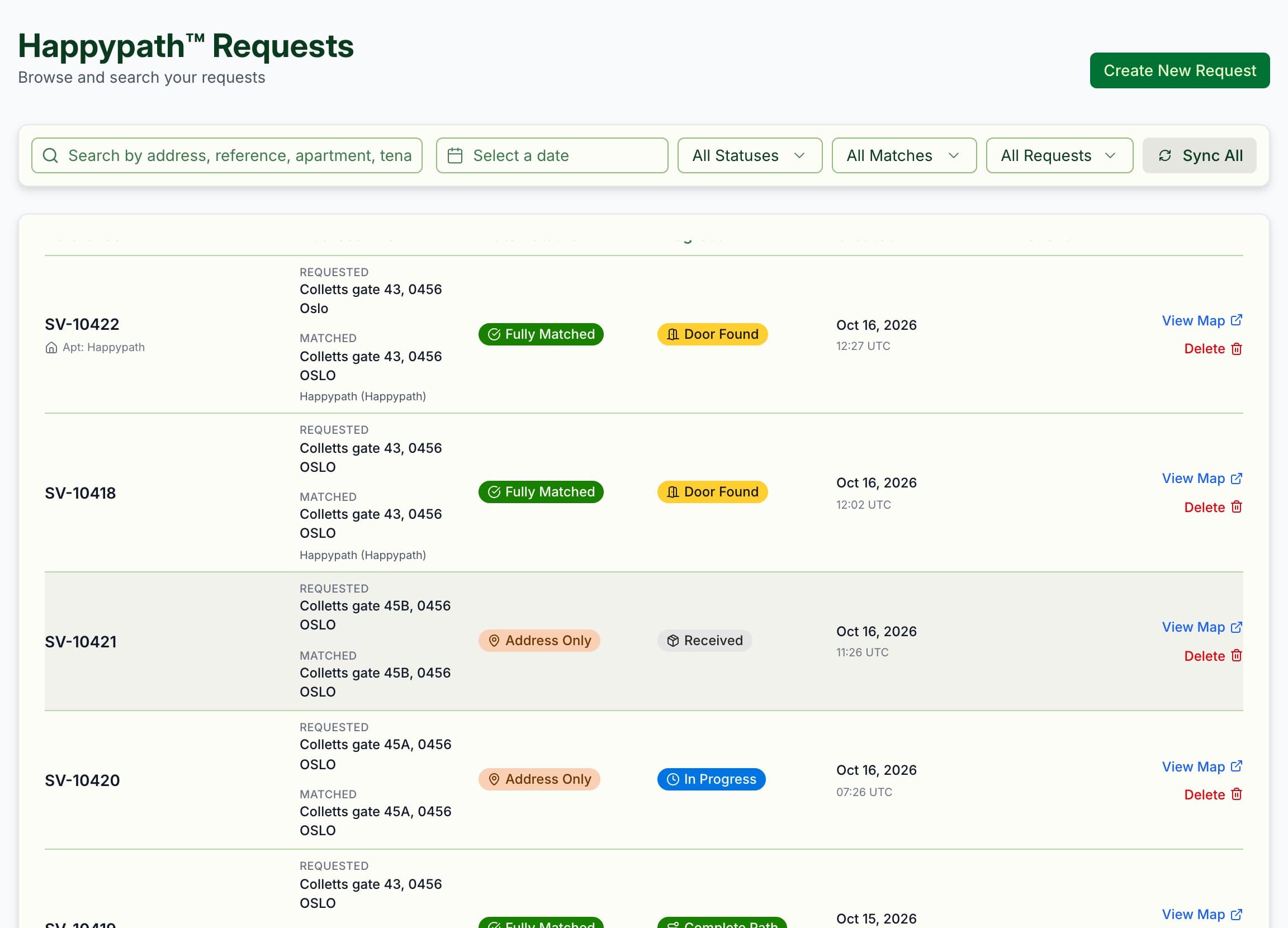
Follow every request
Order reference, whether the address, tenant and door were found, and how far the recipient got. Open the map, or create a request by hand.
Interactive docs
Try every endpoint with your own key, with examples in cURL and JavaScript.
Usage statistics
Requests created, door-data calls, directions-link visits and Companion unlocks, per day.
Checkout playground
Try the Checkout widget in a demo shop before you install it.
Stop list import
Turn a TMS screenshot, a shipping label or a PDF into a list of stops.
Branding, team and billing
Logo, colours and texts for your collection links, invite colleagues, onboard drivers with a QR code and see active devices per month.
Built for production data
You choose who sees it
What you collect is shared by default so every courier benefits, or private to your organisation if you need it.
Scoped to your country
Address search and matching follow your account's country.
Hard to scrape
Map-area queries are limited to small areas and 250 addresses per call.
Every call counted
Usage shows up in the Partner Portal, broken down by surface.
Build on the last metre
API access is switched on per account. Tell us what you're building and we'll switch it on for you.