Happypath™ Checkout · React component
Get the right door the moment the order is placed
Happypath Checkout is a component for your web shop's checkout. The shopper picks who is receiving and which entrance the courier should use. You save a door id and a walking-directions link with the order.
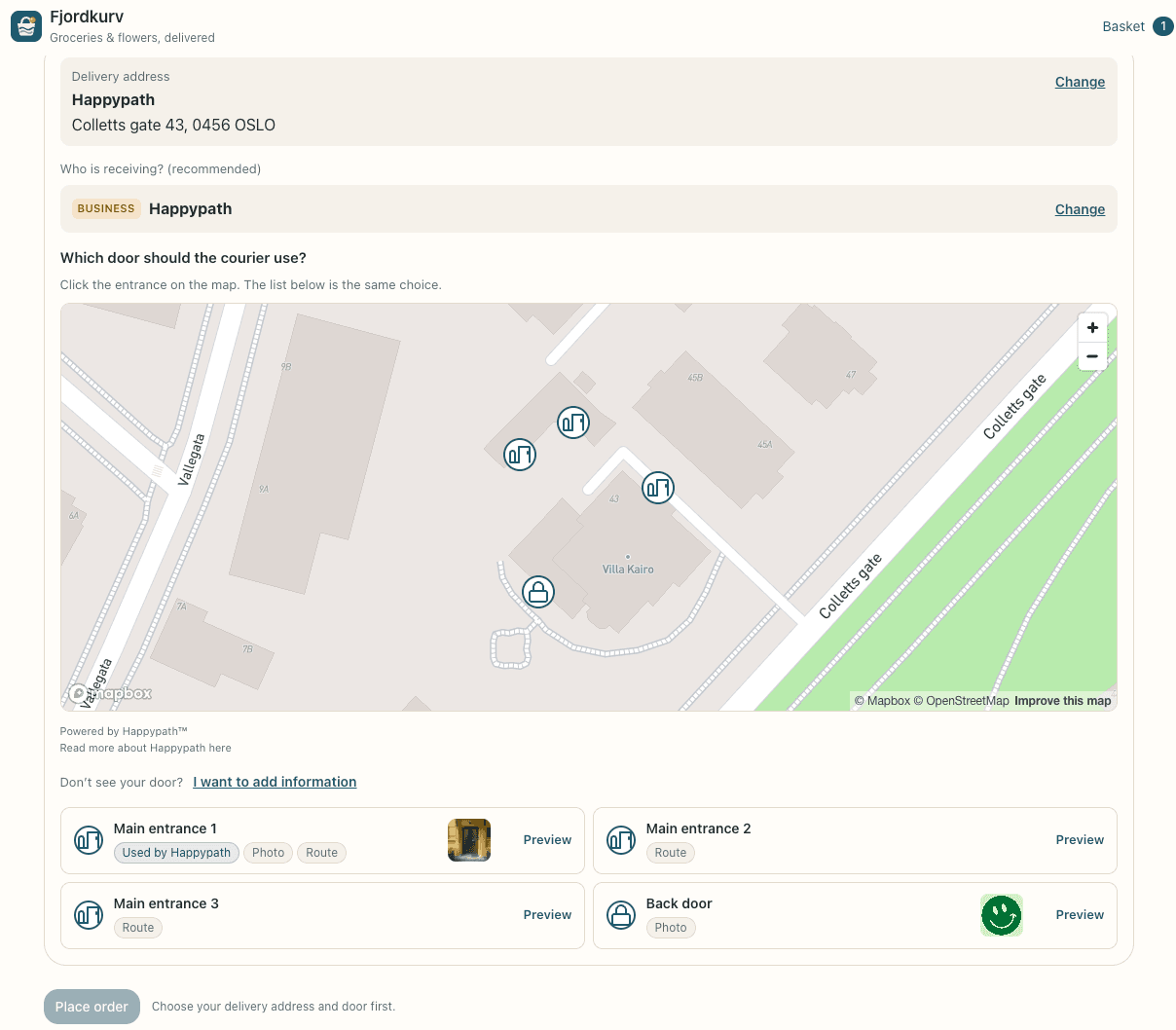
Three choices
From address to entrance in seconds
The shopper looks up the address, and the component shows what Happypath knows about the place.
- Search for an address or a business. Addresses come first, and a business leads to its street address.
- Who is receiving? A searchable list of the businesses and apartments at the address, tagged Business or Unit.
- Which door? Every mapped entrance on a map and in a list, with photos, the walking route and what we know about the elevator, floor and doorbell.

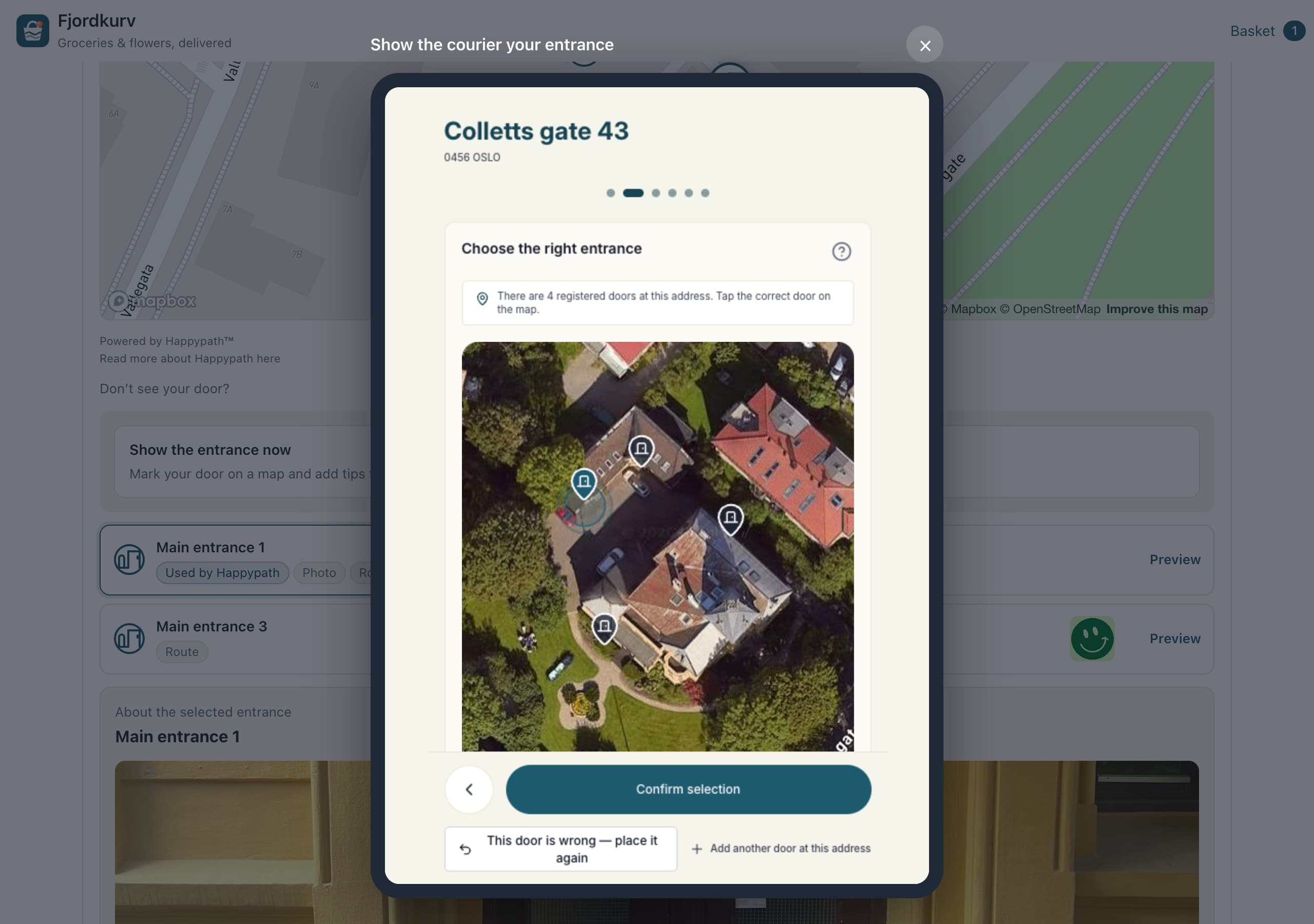
No door yet?
Collect it while the shopper is at checkout
“Don't see your door?” is always there. The shopper can show the entrance right away in a tablet-sized window, or get a link and finish later.
- The same Collection flow recipients get from couriers.
- You send the link yourself, by SMS, email or in your own app.
- An order without a door can still go through once the link is sent.
What you store
Plain JSON on the order
Save the selection with the order as it is. The directions link goes to the courier, and DoorSummary shows the choice on the order confirmation.
- A door id and a directions link when a door was picked.
- The collection status when the shopper used a collection link.
- onValidityChange tells you when to enable Place order.
{
  "label": "Happypath — Colletts gate 43, 0456 OSLO",
  "streetAddressId": "str_VtExpcARXZd3",
  "happypathTenantId": "tnt_BiAljmn4mZwC",
  "happypathDoorId": "edo_…",
  "doorType": "MAIN_ENTRANCE",
  "directionsUrl": "https://go.happypath.no/v/edo_…"
}
Install
A few lines in your checkout
React 18 or newer, ESM and CommonJS, TypeScript types included. Works with Next.js (App and Pages Router), Vite, Remix and webpack.
npm install @happypath-as/checkout-widget

import { HappypathProvider, HappypathCheckout } from '@happypath-as/checkout-widget';
import '@happypath-as/checkout-widget/styles.css';

<HappypathProvider apiKey="HP_PUBLIC_..." locale="nb">
  <HappypathCheckout
    value={selection}
    onChange={setSelection}
    onValidityChange={setValid}
    customerReference={orderId}
    brandColor="#1E5A6E"
  />
</HappypathProvider>
Built for web shops
Key and allowed domains
Create a publishable key (HP_PUBLIC_) in the Partner Portal and allow your shop's domains. It only works from the domains you allow, and can only search, show entrances and create collection links. Your secret API key stays on your server.
Your channel, your message
The collection link goes out through your own SMS, email or app. Happypath does not message shoppers.
Your look
Your brand colour on the map and door icons, CSS variables for the rest, and copy in English and Norwegian.
Search in your country
Address and business search is scoped to your country, with addresses first.
Try it in your checkout
Get a publishable key, or let us show you the demo shop with an address you know.